Module 2: Kubernetes Distributions — RKE2 & K3s
Module Purpose
Understand the architecture, security posture, use-cases, and decision criteria for SUSE's two flagship Kubernetes distributions: RKE2 (enterprise production) and K3s (edge & lightweight).
Overview
SUSE offers three Kubernetes distributions, each designed for a distinct use-case:
| Distribution | Profile | Key Design Goal |
|---|---|---|
| RKE2 (Rancher Kubernetes Engine 2) | Enterprise production | FIPS 140-2, CIS-hardened, HA control plane, static pods |
| K3s | Edge & lightweight | <100 MB binary, SQLite3 or etcd, batteries-included, single-binary install |
| RKE1 (legacy) | Deprecated (EOL roadmap) | Docker-based, no longer recommended for new deployments |
RKE1 Deprecation
Rancher Kubernetes Engine 1 (RKE1) is on a formal end-of-life trajectory. SUSE has GA'd migration tooling (RKE1 → RKE2). All new deployments should use RKE2. See the Rancher Prime migration guide for details.
RKE2 — Enterprise Kubernetes Distribution
RKE2 is SUSE's CIS-hardened, FIPS 140-2-validated Kubernetes distribution for production data center and public cloud workloads. It is also known as RKE Government for its compliance pedigree.
Architecture
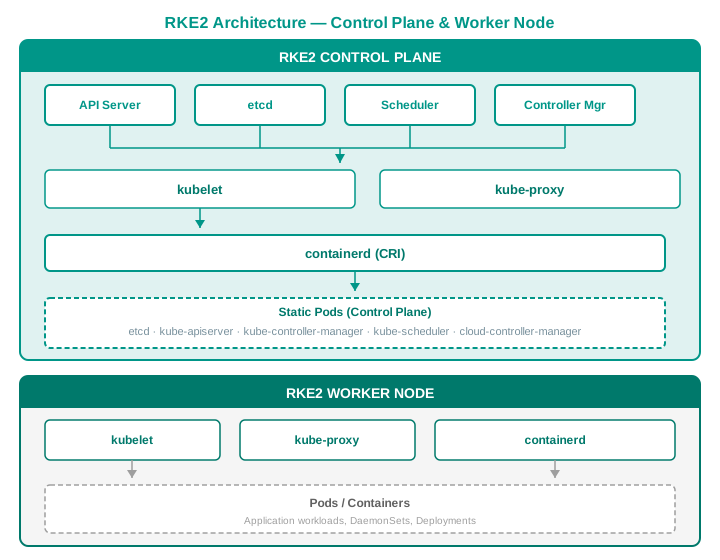
Key architectural characteristics:
- Static Pods: All control-plane components (etcd, apiserver, scheduler, controller-manager) run as static pods managed directly by kubelet — no Docker or container runtime dependencies at bootstrap.
- containerd: The only supported CRI runtime (no Docker shim). FIPS-validated containerd build available.
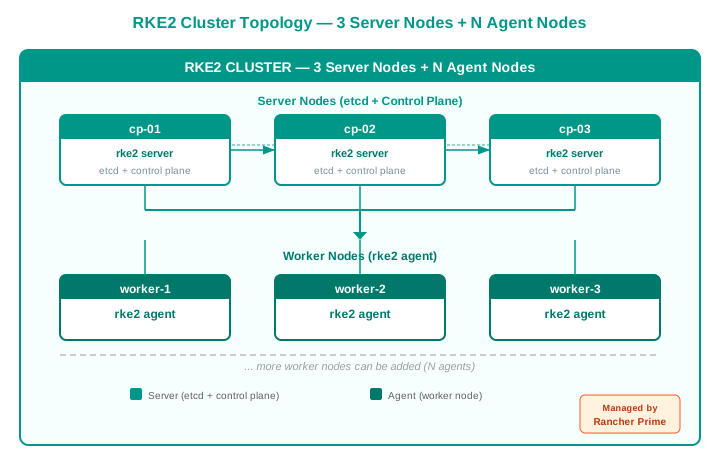
- etcd: The default datastore; HA etcd cluster is auto-configured with 3+ control-plane nodes.
- cis-operator: A built-in CIS benchmark scanner that validates the cluster against the CIS Kubernetes Benchmark on every boot.
- Single binary: RKE2 ships as a single binary (
rke2) that bundles kubelet, containerd, kubectl, crictl, and all control-plane components.
Security & Compliance
| Feature | Detail |
|---|---|
| FIPS 140-2 | RKE2 is FIPS 140-2 validated (NIST). All cryptographic modules use FIPS-approved algorithms. |
| CIS Benchmark | Ships with cis-operator that automatically scans and reports compliance against the CIS Kubernetes Benchmark. |
| Static pods | No daemon-set race or container-runtime bootstrap issues — control plane is expressed as manifest files on disk. |
| containerd | Only containerd is supported; no Docker daemon attack surface. Minimal, audited, FIPS-hardened. |
| Secrets encryption | Supports encryption at rest for etcd secrets using AES-CBC or KMS providers. |
| Pod Security Standards | Built-in PSA (Pod Security Admission) with rancher-default profile pre-configured. |
Example — RKE2 Configuration (config.yaml)
RKE2 configuration is stored in /etc/rancher/rke2/config.yaml and includes the cluster token, TLS SANs, CIS profile selection, kubelet arguments (e.g., max pods, eviction thresholds), etcd snapshot settings, and cloud provider configuration.
CIS profile
Set profile: cis-1.24 (or the version matching your K8s release) to automatically apply all CIS hardening rules on boot.
RKE2 Instance Types (Server vs. Agent)
The 'Why RKE2' Positioning Script
"You need production-grade Kubernetes that passes your security team's compliance checklist. RKE2 is the only distribution that ships FIPS 140-2-validated, CIS-hardened out of the box, with a single-binary install and static-pod control plane. If your customer runs SAP, Temenos, or government workloads, RKE2 is the answer.
No Docker. No race conditions. No compliance gaps.
— SUSE Cloud Native Enablement Team"
K3s — Lightweight Kubernetes for Edge
K3s is the CNCF-certified lightweight Kubernetes distribution (<100 MB binary) designed for edge, IoT, ARM, resource-constrained, and air-gapped environments.
Architecture
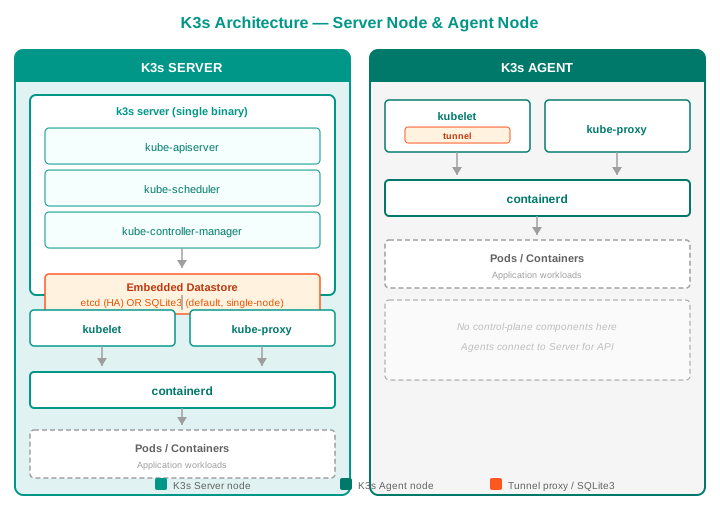
Key architectural characteristics:
- Single binary: K3s is a single ~70 MB binary (
k3s) that runs as both server and agent. - Embedded datastore: Default is embedded SQLite3 (no etcd needed). Optionally switch to embedded etcd for HA.
- Batteries-included: Ships with Traefik (ingress), CoreDNS, Local Path Provisioner, HelmController, and Metrics Server — all built-in.
- containerd: Bundled CRI runtime, same as RKE2.
- Tunnel proxy:
k3s serverruns a built-in tunnel proxy so agents can connect to the server without direct network access to the apiserver (useful for NAT'd edge devices). - ARM64 / ARMv7 / RPi5: First-class support for ARM architectures.
Batteries-Included Components
| Component | Role | Included By Default |
|---|---|---|
| Traefik | Ingress controller | Yes (v2.x) |
| CoreDNS | Cluster DNS | Yes |
| Local Path Provisioner | Dynamic local volume provisioning | Yes |
| HelmController | Helm chart management via CRDs | Yes |
| Metrics Server | Resource metrics API | Yes |
| ServiceLB | Load-balanced service IPs on bare metal | Yes (klipper) |
| containerd | Container runtime | Yes (bundled) |
Example — K3s Installation (Single-Node)
A single-node K3s install is performed by piping the K3s installation script into a shell with flags to configure kubeconfig permissions and disable optional components like Traefik.
Example — K3s HA with Embedded etcd
K3s HA with embedded etcd is configured via /etc/rancher/k3s/config.yaml on each server node, specifying the cluster token, TLS SANs, and whether the node initializes the cluster as the first server.
The first server node is bootstrapped with the --cluster-init flag, while additional servers and agent nodes join by pointing to the existing server's address with the shared token.
SQLite3 vs. etcd
- SQLite3 (default): Best for single-node or edge deployments. Zero config, no separate datastore to manage. Do not use for multi-server HA clusters.
- Embedded etcd: Required for HA with 3+ server nodes. Auto-configured; no external etcd binary needed.
K3s at the Edge
K3s is the foundation of SUSE's edge strategy. See Module 6: Edge Computing for the full deep-dive.
| Edge Scenario | Why K3s |
|---|---|
| Factory floor | <100 MB, runs on industrial gateways, offline-capable with Fleet |
| Retail / branch | SQLite3 means no etcd maintenance in remote stores |
| IoT / Raspberry Pi | Official ARM64 / ARMv7 builds; tested on RPi5 |
| Air-gapped | Single-binary install bundles all images; no internet needed |
| Vehicle / drone | Lightweight enough for 2 GB RAM, 2 CPUs |
| Disconnected edge | Fleet's bundled GitOps handles offline image sync |
The 'Why K3s' Positioning Script
"When your Kubernetes cluster needs to fit on a Raspberry Pi, an industrial gateway, or a disconnected oil rig, K3s is the answer. It's a CNCF-certified, production-tested K8s distribution in a single 70 MB binary with SQLite3 so you don't need to run etcd.
Batteries-included, zero config, air-gap ready.
— SUSE Cloud Native Enablement Team"
RKE1 vs. RKE2 vs. K3s — Complete Comparison
| Feature | RKE1 (Legacy) | RKE2 (Enterprise) | K3s (Edge) |
|---|---|---|---|
| Status | EOL roadmap announced | Current enterprise offering | Current edge offering |
| Binary size | ~200 MB (multi-component) | ~200 MB | ~70 MB |
| Control plane | Docker containers (docker run) | Static pods (kubelet-managed) | Embedded process / static pods |
| Container runtime | Docker | containerd only | containerd only |
| Datastore | External etcd (manual) | Bundled etcd (auto HA) | SQLite3 (default) or embedded etcd |
| FIPS 140-2 | ❌ Not validated | ✅ Validated | ❌ Not validated (but available via RKE2) |
| CIS Benchmark | Manual scan | Built-in cis-operator | Via k3s cis subcommand |
| HA out of the box | Manual configuration | ✅ Auto (3+ server nodes) | ✅ With embedded etcd |
| TLS / Certificates | Manual CA management | ✅ Auto-rotating, cert-manager | ✅ Auto-rotating |
| Ingress bundled | No | No (optional Nginx/custom) | ✅ Traefik (default) |
| ARM support | Limited | Limited | ✅ Full ARM64/ARMv7 |
| Air-gap install | Complex | Tarball + images.tar | ✅ Single tarball |
| Upstream K8s version | Tracks upstream | Tracks upstream (same week) | Tracks upstream (same week) |
| SAP certified | No | ✅ Yes | ✅ Yes (recent) |
| Temenos certified | No | ✅ Yes | Pending |
| Ideal use-case | Legacy migration only | DC, cloud, regulated, SAP | Edge, IoT, ARM, branch |
When to Choose Which — Decision Criteria
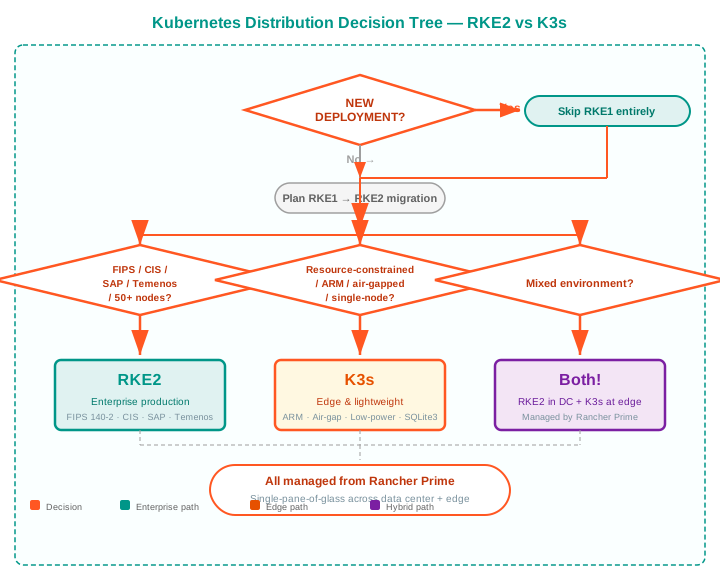
Common pattern: Hybrid deployment
Many customers run RKE2 in data centers / clouds for regulated production workloads and K3s at edge locations for retail, factory, or branch offices — all managed from a single Rancher Prime instance. This is SUSE's differentiated sweet spot.
Cross-Links
| Module | Topic | Connection to This Module |
|---|---|---|
| Module 1: Strategy & Platform Overview | Platform stack, market position | Understand where RKE2 and K3s fit in the layered stack |
| Module 3: Rancher Prime | Multi-cluster management | How to manage RKE2 and K3s clusters centrally |
| Module 4: NeuVector | Container security | Security for RKE2 and K3s clusters |
| Module 5: Harvester | VM virtualization | Running VMs alongside RKE2 / K3s nodes |
| Module 6: Edge Computing | K3s at the edge | Deep-dive on K3s in edge, IoT, and air-gapped environments |
| Module 7: Storage & GitOps | Longhorn + Fleet | Stateful storage on RKE2, GitOps delivery to both distros |
| Module 8: Kubewarden | Policy as Code | Admission policies for RKE2 and K3s clusters |
| Module 9: Ecosystem & Competitive | Competitive positioning | RKE2/K3s vs. OpenShift, Tanzu, GKE, AKS |
| Module 10: Sales Scenarios by Vertical | Customer conversation | |
| Module 11: MultiLinux Management | Multi-distro Linux management |
Summary
- RKE2 is the enterprise choice: FIPS 140-2, CIS-hardened, static-pod control plane, HA etcd, SAP/Temenos certified. Use it for data centers, public clouds, and regulated workloads.
- K3s is the edge choice: 70 MB, SQLite3 or embedded etcd, batteries-included, ARM-ready, air-gap capable. Use it for IoT, factory floors, retail branches, and anything resource-constrained.
- RKE1 is deprecated. Migrate to RKE2.
- Both distributions are managed from the same Rancher Prime console, enabling a single-pane-of-glass across the entire infrastructure footprint.
Quick start
- Need a hardened production cluster? Install RKE2:
curl -sfL https://get.rke2.io | sh - - Need a lightweight edge cluster? Install K3s:
curl -sfL https://get.k3s.io | sh - - Need to manage both? Deploy Rancher Prime on RKE2 and import your K3s clusters.