Module 8: Policy as Code — Kubewarden
Module Overview
Kubewarden is a CNCF Sandbox project that reimagines Kubernetes admission control through WebAssembly (WASM) — enabling policies written in any programming language, distributed via container registries, and executed in a sandboxed runtime. It is the policy-as-code engine in the SUSE Cloud Native security stack, complementary to NeuVector runtime security and integrated into Rancher Prime.
What Is Kubewarden?
Kubewarden is a universal policy engine for Kubernetes that uses WebAssembly (WASM) as its policy execution runtime. It processes admission requests through the Kubernetes ValidatingWebhookConfiguration and MutatingWebhookConfiguration mechanisms, evaluating policies written as WASM modules.
"Kubewarden is not 'yet another policy engine' — it is a fundamentally different approach to policy as code. Instead of forcing you into a single DSL (like Rego for OPA, or YAML patterns for Kyverno), Kubewarden lets you write policies in any language that compiles to WebAssembly — Rust, Go, CEL, Rego, JavaScript, Swift, and more. The WASM module is the policy."
| Property | Kubewarden | OPA/Gatekeeper | Kyverno |
|---|---|---|---|
| CNCF Status | Sandbox | Graduated (OPA) | Not in CNCF |
| Policy language | Any language → WASM | Rego (DSL) | YAML-based DSL |
| Distribution | Container registry (OCI artifact) | OPA bundles (JSON/Rego) | YAML manifests |
| Execution sandbox |  WASM sandbox WASM sandbox |
 Rego evaluator (no sandbox) Rego evaluator (no sandbox) |
Native Go execution |
| Runtime performance | Fast (native WASM execution) | Moderate (Rego evaluation) | Fast (native Go) |
| Policy isolation | Per-policy sandbox |
 All policies in same OPA process All policies in same OPA process |
All policies in same webhook |
| Language flexibility | Any language | Rego only | YAML patterns only |
| Audit mode | |
|
|
| Mutation support | |
(limited) |
(rich) |
| Context-aware (cluster state) | (via kubewarden-context-aware) |
(via OPA data) |
(native) |
| Built-in Rancher UI | |
Manual |
Manual |
| Marketplace / catalog | Kubewarden Hub |
OPA Bundles |
Kyverno Policies |
| SBOM scanning (new) | (v1.36+) |
|
|
Why This Matters
The ability to write policies in any language means your existing development team can contribute policies without learning Rego or a new DSL. A Rust developer writes Rust → WASM. A Go developer writes Go → WASM. A platform engineer writes CEL expressions directly. The same CI/CD pipeline that builds your applications can build and test your policies.
Why It's Different
| Traditional Policy Engine | Kubewarden |
|---|---|
| Policy is written in a proprietary DSL (Rego for OPA, YAML patterns for Kyverno) | Policy is written in any language that compiles to WASM |
| Policy execution happens in a shared runtime (all policies share one process) | Each policy runs in its own WASM sandbox — no cross-policy interference |
| Policy distribution is file-based (OPA bundles, YAML files) | Policy distribution is registry-based (OCI artifacts — same as container images) |
| Policy execution is not sandboxed — a buggy policy can crash the evaluator | Policy execution is fully sandboxed — a panic in one policy cannot affect others |
| Adding a new language requires extending the engine | Adding a new language requires only a WASM compiler target |
How It Works
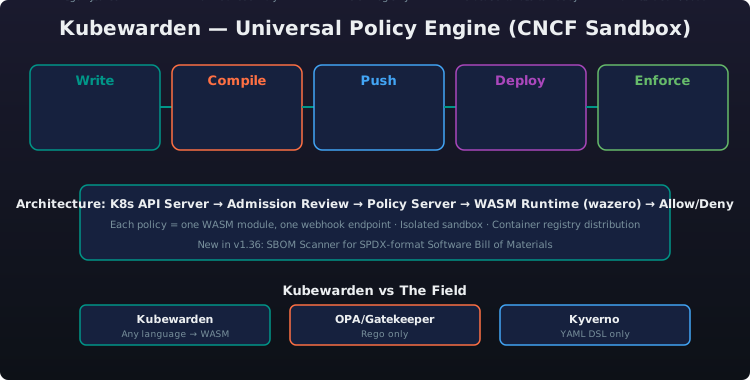
The Kubewarden policy lifecycle follows a simple pipeline with four stages:
- Write — A policy author writes a policy using a supported language (Rust, Go, CEL, Rego, JavaScript, Swift)
- Compile — The source code is compiled to a
.wasmbinary - Distribute — The WASM module is pushed to an OCI-compliant container registry (Docker Hub, Harbor, GHCR, Quay) as an OCI artifact — the same way you push container images
- Deploy — A
ClusterAdmissionPolicyorAdmissionPolicyCRD references the registry URI; the Policy Server pulls the WASM module and instantiates it in a sandbox - Enforce — Kubernetes admission requests are forwarded to the Policy Server, which evaluates the policy and returns
allowordeny
A ClusterAdmissionPolicy resource references a WASM module from an OCI registry (e.g., ghcr.io/kubewarden/policies/host-network-psp:v0.1.11) and defines the Kubernetes API resources and operations it evaluates, along with any policy-specific settings.
Supported Languages
Kubewarden's language support is a core differentiator. Any language with a WASM compiler target can be used:
| Language | Status | Best For |
|---|---|---|
| Rust | GA (recommended) |
Performance-critical policies, type-safe development, rich SDK (kubewarden-policy-sdk-rust) |
| Go | GA |
Teams already using Go for operators/controllers; tinygo compiler produces WASM modules |
| CEL | GA |
Simple, declarative policies; no compilation needed (CEL expressions are compiled to WASM internally) |
| Rego | GA |
Teams migrating from OPA/Gatekeeper — write Rego, compile to WASM, run on Kubewarden |
| JavaScript | Beta |
Node.js teams; JavaScript policy logic compiled via QuickJS WASM runtime |
| Swift | Experimental |
Apple ecosystem developers; SwiftWasm compiler |
| TinyGo | GA |
Minimal WASM binary size; fastest compilation path for Go policies |
// Example: A simple Kubewarden policy in Rust
use kubewarden_policy_sdk::*;

#[no_mangle]
pub extern "C" fn validate(payload: *mut u8, payload_size: u32) -> u64 {
    let request: ValidationRequest = from_bytes(payload, payload_size).unwrap();

    // Extract the pod from the admission request
    let pod: Pod = serde_json::from_value(request.request.object).unwrap();

    // Policy logic: deny privileged containers
    if pod.spec.containers.iter().any(|c| c.security_context.privileged == Some(true)) {
        return reject("Privileged containers are not allowed".to_string());
    }

    accept()
}
# Example: Same policy in CEL (Common Expression Language)
# Compiled to WASM and run in Kubewarden
cel_expr: >
  !object.spec.containers.exists(c,
    has(c.securityContext) &&
    has(c.securityContext.privileged) &&
    c.securityContext.privileged == true
  )
message: "Privileged containers are not allowed"
# Example: Same policy in Rego (compiled to WASM for Kubewarden)
package kubewarden

import future.keywords.if
import future.keywords.in

policy_name := "deny-privileged"

result := {
  "allowed": not is_privileged,
  "message": "Privileged containers are not allowed"
} if {
  is_privileged := any_privileged(input.request.object.spec.containers)
}

any_privileged(containers) = true if {
  some c in containers
  c.security_context.privileged == true
}
Architecture
Kubewarden's architecture consists of four main components:
| Component | Role |
|---|---|
| Policy Server | A Kubernetes Deployment that loads and executes WASM policies; each policy runs in its own sandbox; the server handles admission requests and returns policy decisions |
| WASM Runtime (wazero) | Pure Go WebAssembly runtime — no CGo, no LLVM, no JIT; runs policies in a secure sandbox with memory isolation, CPU limits, and syscall filtering |
| Admission Webhook | Standard Kubernetes ValidatingWebhookConfiguration and MutatingWebhookConfiguration that forwards admission requests to the Policy Server |
| CRDs | Kubernetes custom resources that define policies, their scope (cluster vs namespace), settings, and policy server configuration |
CRDs in Detail
A cluster-scoped ClusterAdmissionPolicy like deny-privileged applies across all namespaces. It references the policy's OCI image, defines the API groups and resources it targets, and can enable background audit mode with backgroundAudit: true to log violations without blocking.
A namespace-scoped AdmissionPolicy like require-labels affects only the specified namespace. It enforces that created or updated pods carry required labels such as app.kubernetes.io/name and app.kubernetes.io/version.
A PolicyServer custom resource configures the Policy Server deployment, including the container image, replica count, environment variables (e.g., log level), and resource limits for CPU and memory.
Key Features
Audit Mode (Background Audit)
Kubewarden supports audit mode via the backgroundAudit: true flag on policies. In audit mode:
- Policies evaluate existing resources in the cluster, not just new requests
- Violations are logged and reported but not blocked
- Useful for testing new policies before enforcing them
- Audit results are visible in the Kubewarden dashboard and Rancher Prime UI
Policy Groups
Policy groups allow combining multiple policies into a single evaluation:
ClusterAdmissionPolicyGroup— group of policies evaluated together- Use when multiple conditions must be checked before allowing a resource
- Reduces webhook call overhead — one admission request evaluates all policies in the group
- Supports logical operators (AND, OR) across policy results
Policy Server Autoscaling
The Policy Server Deployment can be auto-scaled based on admission request volume:
- Use
HorizontalPodAutoscalerbased on CPU/memory or custom metrics - Each Policy Server instance handles multiple policies in separate WASM sandboxes
- Stateless — new replicas pull policies from the same OCI registry
OCI-Based Distribution
All Kubewarden policies are OCI artifacts — they live in container registries alongside your application images:
- Same authentication (Docker Hub, Harbor, GHCR, ECR, ACR)
- Same RBAC (registry-level access control)
- Same supply chain signing (cosign signatures on WASM modules)
- Same mirroring for air-gapped deployments
Use kwctl push to upload a compiled WASM policy to an OCI registry, kwctl annotate to add metadata like descriptions and URLs, and kwctl pull / kwctl inspect to retrieve and examine policies from the registry.
SBOM Scanner (New in v1.36)
New Feature — Kubewarden 1.36+
Kubewarden v1.36 introduces a built-in SBOM (Software Bill of Materials) Scanner that analyses WASM policy modules for known vulnerabilities:
- Automatic scanning — Every policy pulled from an OCI registry is scanned for CVEs in its WASM dependencies
- Policy-level SBOM — Generates SPDX-format SBOM for each WASM module
- Integration with NeuVector — SBOM results can be forwarded to NeuVector for centralised vulnerability management
- Admission integration — Block policy deployment if the WASM module contains critical CVEs
- Audit log — SBOM scan results visible in the Kubewarden dashboard and Rancher Prime UI
SBOM scanning is enabled via environment variables on the PolicyServer resource — KUBEWARDEN_SBOM_ENABLED: "true" activates scanning, and KUBEWARDEN_SBOM_BLOCK_CRITICAL: "true" prevents deployment of policies with critical CVEs.
Integration with Rancher Prime
Kubewarden is a first-class citizen in Rancher Prime:
One-Click Deployment
- Kubewarden appears in the Rancher Prime Apps & Marketplace catalog
- Deploy to any managed or imported cluster with a single click
- Pre-configured with default Policy Server settings
Policy Management in Rancher UI
- Policy catalog — Browse Kubewarden Hub policies from the Rancher UI
- Policy creation — Create
ClusterAdmissionPolicyandAdmissionPolicyCRDs through the UI - Audit results — View policy violations per-namespace and per-cluster
- Policy status — See which policies are active, their health, and their evaluation stats
Fleet Integration
Kubewarden policies can be deployed via Fleet GitOps across multiple clusters:
A Fleet Bundle resource targets all production clusters (via clusterSelector) and deploys multiple ClusterAdmissionPolicy resources — such as deny-privileged and require-resource-limits — ensuring consistent policy enforcement across the fleet.
RBAC Integration
Kubewarden policies respect Rancher Prime's RBAC model:
- Project-scoped policies — Namespace-scoped
AdmissionPolicywithin a Rancher project - Cluster-scoped policies —
ClusterAdmissionPolicyapplied cluster-wide by cluster admins - Audit-only permissions — Operators can view policy violations without the ability to modify policies
Complementary Security: Kubewarden + NeuVector
Kubewarden and NeuVector serve complementary roles in the SUSE Cloud Native security stack:
| Security Layer | Kubewarden | NeuVector |
|---|---|---|
| Admission control | Native — evaluate and block resource creation/modification |
Admission control based on image vulnerability severity |
| Runtime security | Admission only (not runtime) |
Native — eBPF-based runtime monitoring, process/file/network |
| Policy as code | Native — WASM-based, any language |
Not policy-as-code (rule-based) |
| Image scanning | SBOM scanning of WASM policies (v1.36+) |
Full container image CVE scanning |
| Network security | Not applicable |
WAF, DLP, network micro-segmentation |
| Compliance auditing | Policy violation audit logs |
CIS, NIST, PCI, HIPAA, GDPR |
| Supply chain security | OCI registry + cosign for policies |
Image signing verification, SBOM generation |
The SUSE Cloud Native Security Stack operates at two layers: Admission (pre-deployment) where Kubewarden enforces WASM policies (deny privileged containers, require resource limits, enforce namespace labels) and NeuVector performs image scanning to block critical CVEs on admission; and Runtime (post-deployment) where NeuVector provides eBPF-based process monitoring, file system protection, and network segmentation.
The Complete Security Story
Kubewarden blocks bad configurations before they reach the cluster; NeuVector detects and prevents attacks that happen at runtime. For example: Kubewarden prevents a deployment from running as root (admission), while NeuVector detects and blocks a container that unexpectedly starts a reverse shell (runtime). Together, they provide defence-in-depth from CI/CD through production.
Kubewarden vs OPA/Gatekeeper vs Kyverno — Comparison Table
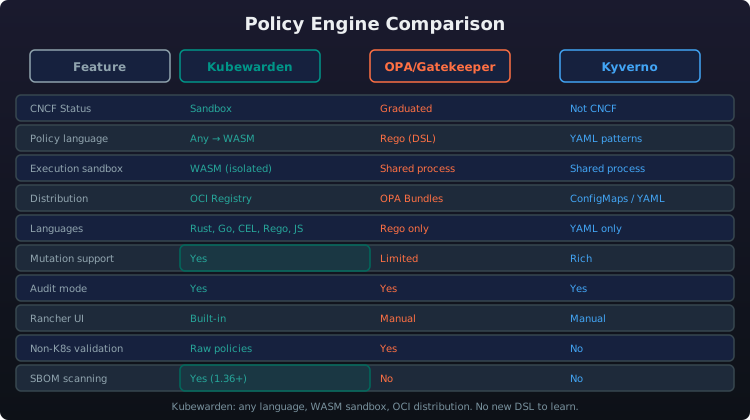
| Dimension | Kubewarden | OPA/Gatekeeper | Kyverno |
|---|---|---|---|
| CNCF Status | Sandbox |
Graduated (OPA) |
Not in CNCF |
| Policy Language | Any → WASM (Rust, Go, CEL, Rego, JS, Swift) | Rego (DSL) | YAML patterns (DSL) |
| Execution Model | Sandboxed WASM per policy | Single Rego evaluator | Native Go |
| Policy Distribution | OCI Registry (container-native) | OPA Bundles (files/HTTP) | YAML manifests |
| Multi-Language Support | Excellent |
Rego only |
YAML only |
| Sandbox Isolation | Full (WASM sandbox) |
Shared process |
Shared process |
| Mutation Support | Full |
Limited (Gatekeeper) |
Rich |
| Generate Resources | Not supported |
Not supported |
Native |
| Context-Aware | Via kubewarden-context-aware |
OPA data |
Native |
| Audit Mode | |
|
|
| Built-in Policies Catalog | Kubewarden Hub |
OPA Bundles |
Kyverno Policies |
| Rancher Prime UI | Native |
Manual |
Manual |
| SBOM Scanning | (v1.36+) |
|
|
| Performance | Fast (native WASM) | Moderate (Rego EVAL) | Fast (native Go) |
| Learning Curve | Medium (any language) | High (must learn Rego) | Low (YAML patterns) |
| Enterprise Support | SUSE Prime subscription | Vendors (Styra, others) | Vendors (Nirmata) |
| Dimension | Best Choice |
|---|---|
| Best for Rancher Prime users | Kubewarden — native UI, one-click deploy, Fleet integration |
| Best for multi-language teams | Kubewarden — Rust, Go, CEL, Rego, JS, Swift |
| Best for simple YAML-based policies | Kyverno — lowest barrier to entry |
| Best for OPA/Rego investment | Gatekeeper — existing Rego knowledge re-usable |
| Best for sandboxed security | Kubewarden — only fully sandboxed WASM execution |
| Best for generate/cleanup resources | Kyverno — unique generate/cleanup capabilities |
Deployment Options
Basic Deployment
Kubewarden can be installed using Helm by adding the Kubewarden chart repository and installing the kubewarden-crds, kubewarden-controller, and kubewarden-defaults charts in the kubewarden-system namespace, with options to configure Policy Server replica count and resource limits.
Rancher Prime Deployment
Deploy Kubewarden directly from the Rancher Prime UI:
- Navigate to Apps & Marketplace → Charts
- Search for "Kubewarden"
- Click Install
- Configure Policy Server replica count and resource limits
- Click Launch
The "Why Kubewarden" Positioning Script
Positioning Kubewarden: "Your customer asks: 'We've already adopted OPA/Gatekeeper — we wrote 50 Rego policies. Why would we move to Kubewarden?' * Here's the honest answer: If you're deep in Rego and it works for you, OPA is a fine choice. But ask yourself: who on your team can write and maintain Rego? Now ask who can write Go, or Rust, or CEL, or JavaScript. * Kubewarden doesn't force you to learn a DSL. You write policies in the languages your team already knows — Rust, Go, CEL, Rego, JavaScript, Swift — compile them to WASM, and distribute them through your existing container registry alongside your application images. * And because each policy runs in its own WASM sandbox, a buggy or malicious policy cannot crash the policy server or affect other policies. That's not just theoretical security — it's operational safety that no other admission controller provides. * When you combine Kubewarden with NeuVector for runtime security, you get a complete guardrail system: Kubewarden blocks bad configurations before they reach the cluster, NeuVector detects attacks that happen at runtime. That's defence-in-depth from a single vendor — SUSE."
Cross-References
| Module | Topic | Link |
|---|---|---|
| Module 1: Strategy & Platform Overview | Where Kubewarden fits in the security stack | Policy as code in the integrated SUSE platform |
| Module 2: K8s Distributions | The clusters Kubewarden protects | RKE2 and K3s admission policies |
| Module 3: Rancher Prime | The platform Kubewarden integrates with | One-click deploy, native RBAC, Rancher UI policy management |
| Module 4: NeuVector | Complementary runtime security | Kubewarden blocks bad configs; NeuVector stops runtime attacks |
| Module 5: Harvester | Policy enforcement for VM workloads | Kubewarden policies for Harvester virtual machines |
| Module 6: Edge Computing | Policy as code at the edge | Lightweight Kubewarden policies for K3s clusters in remote sites |
| Module 7: Storage & GitOps | Deploying Kubewarden policies via Fleet GitOps | Policy-as-code delivered across clusters with Fleet bundles |
| Module 9: Ecosystem & Competitive | Kubewarden vs. OPA/Gatekeeper vs. Kyverno | Competitive policy engine positioning |
| Module 10: Sales Scenarios by Vertical | Applying Kubewarden in a customer conversation | PSD2/GDPR/PCI compliance policies for financial services |
| Module 11: MultiLinux Management | Policy enforcement across multi-Linux distributions | Unified policy as code for heterogeneous Linux environments |
| Quick Reference Card | Cheat sheet | Key numbers, product URLs, CLI commands |